 PinTidy
Turn the Maps results you load into a clean lead list
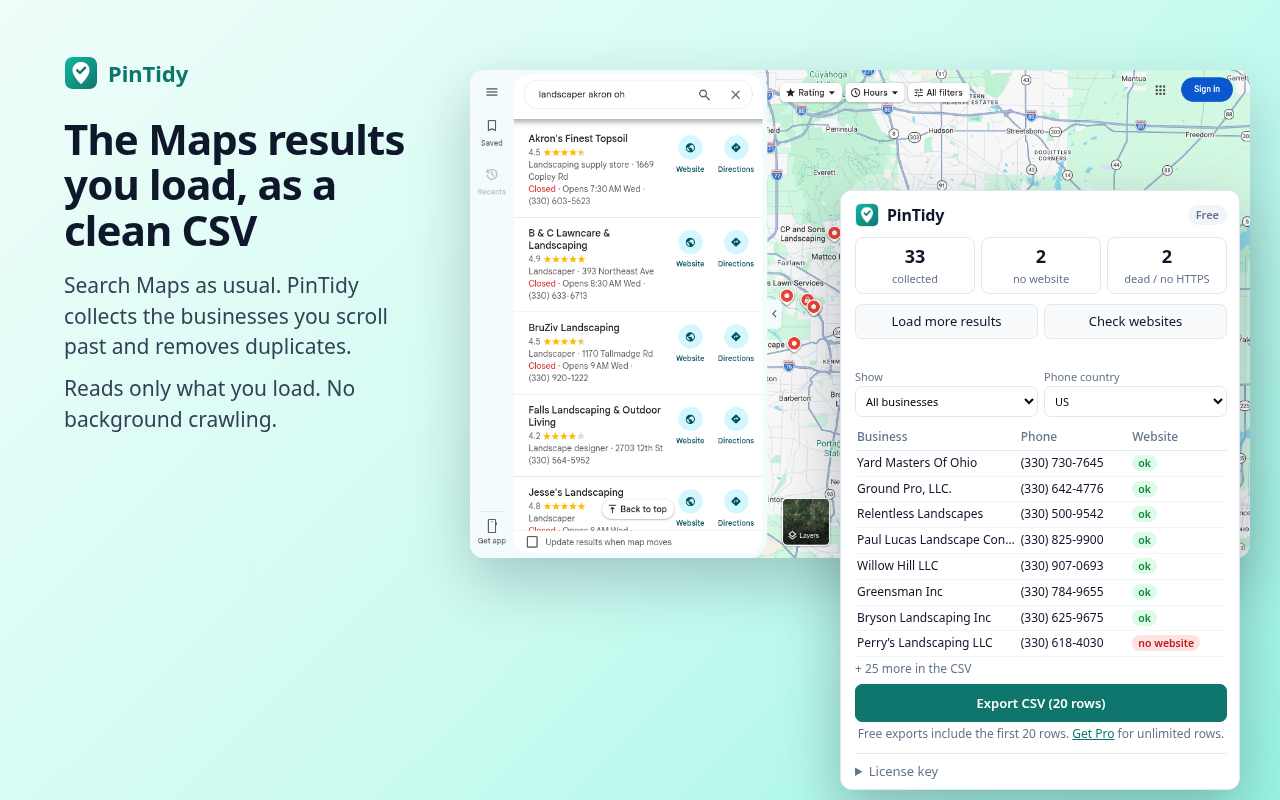
PinTidy is a Chrome extension. Search Maps like you normally do, then export a tidy CSV: duplicates removed, phone numbers formatted, addresses split and every website checked. Filter to businesses with no website and you have a prospect list for web design work.
Free: 20 rows per export. Pro: unlimited rows for $9/month or $29 once.
How it works
Search Maps
Open Maps in Chrome and search, for example landscaper Akron OH. Scroll the list, or press Load more in PinTidy (it scrolls slowly, at most 5 times per click).Check websites
Press Check websites. Each listed site is marked ok, no HTTPS or dead. Businesses without a site are marked no website.Export
Pick No website only (or everything) and export a CSV that opens cleanly in Excel, Google Sheets or your CRM.
What you get in the CSV
No duplicates
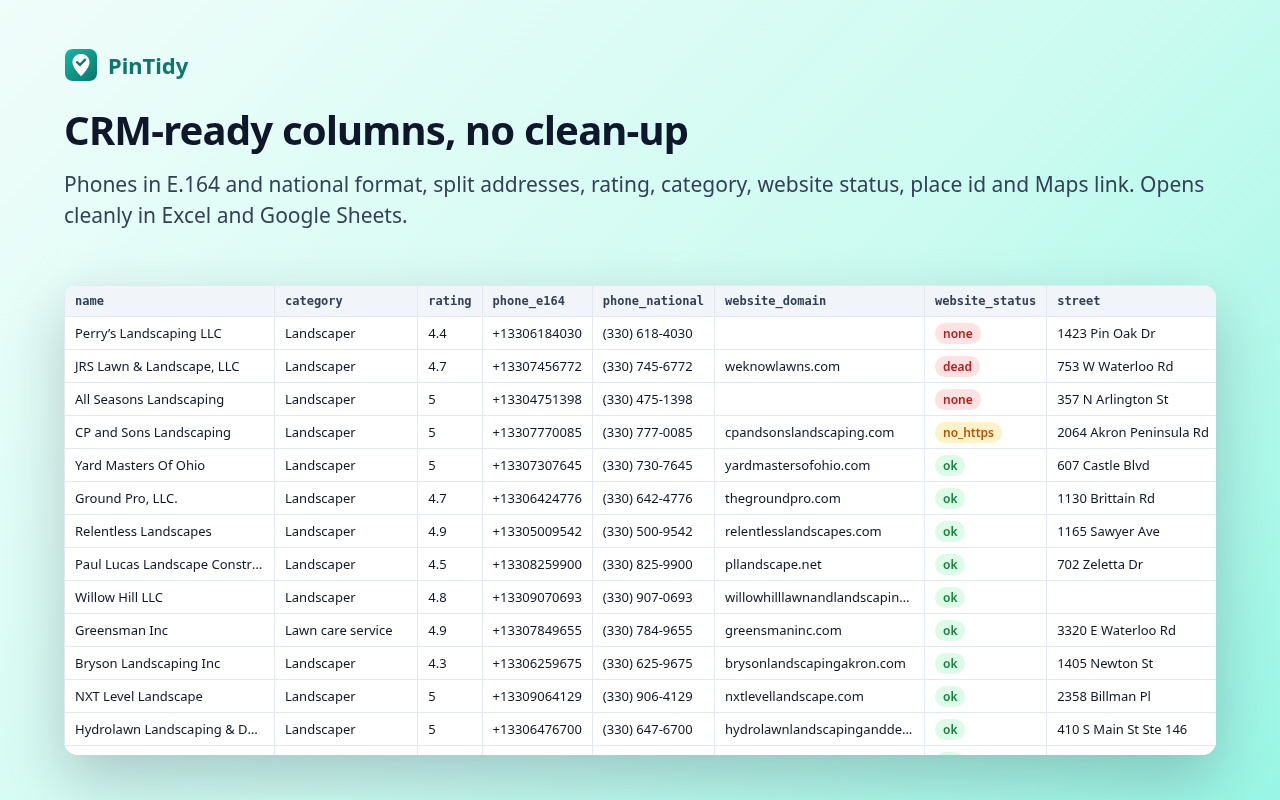
The same business seen in two searches, or twice in one list, becomes one row (matched on the Maps place id, then name + phone).Phones you can dial
Every phone number comes in E.164 (+13305550123) and national format ((330) 555-0123). You pick the default country.Split addresses
Street, city, state/region, postal code and country in separate columns. The list view shows only the street; open a place and PinTidy adds its full address.Website status
none, dead, no_https or ok, plus the final URL after redirects. Tracking tags like utm_ are removed.Rating and category
Rating, review count (when Maps shows it), category, hours note, coordinates, place id and the Maps link.Private by design
Your lists stay in your browser. No account, no uploads, no tracking. Read the privacy policy.Columns: name, category, rating, reviews, phone_e164, phone_national, website, website_domain, website_status, website_final_url, street, city, region, postal_code, country, address_full, hours_note, sponsored, latitude, longitude, place_id, maps_url, search_query, captured_at.
Pricing
Payments are handled by Stripe. After checkout you land on a page with your license key; paste it into PinTidy. Prices in USD; taxes may apply. Refunds on request within 14 days (terms).
Install
PinTidy is awaiting Chrome Web Store review. This page will link to the store listing as soon as it is approved. If you buy Pro before then and change your mind, email jon@telep.io for a full refund.
Use it responsibly
PinTidy is not affiliated with Google. It reads only the results you load in your own browser. It does not crawl in the background and does not bypass any limits.
You are responsible for how you use Maps and the data you export, including complying with Google's Terms of Service and the laws where you and your contacts are (for example CAN-SPAM, TCPA, GDPR, PECR and CASL).
Do not use PinTidy lists for unsolicited mass email or SMS. Call, visit or write to businesses one at a time, identify yourself, and respect do-not-call lists and opt-outs.
FAQ
Does PinTidy scrape Maps in the background?
No. It reads the result cards already on your screen. The optional Load more button scrolls the results list slowly (2–3.5 seconds between scrolls, at most 5 scrolls per click) only when you press it.
What network requests does it make?
Only two kinds: (1) when you press Check websites, a request to each business website in your list to see if it loads; (2) license checks to pintidy.telep.io if you enter a Pro key. Nothing about your searches or lists is sent to us.
Why does it ask for access to all websites?
Only when you press Check websites, because the business sites could be on any domain. It is optional: without it everything else still works. You can remove it at any time in Chrome's extension settings.
Why are some review counts blank?
PinTidy only exports what Maps shows. Maps does not always display review counts in the results list.
Does it find email addresses?
No. PinTidy exports what Maps lists publicly for a business (name, phone, website, address) and checks the website. It does not harvest personal emails.
Which Maps sites does it work on?
www.google.com/maps in Chrome (desktop), in any language. Other country domains (for example google.co.uk) are not supported in version 1.0.
How do refunds and cancellations work?
Email jon@telep.io within 14 days of a payment for a full refund. Monthly plans can be cancelled at any time by email; they stay active until the end of the paid month.